


OBD JScan
4.7602.00 Reviews
App Specs
- Version
- v03.07.2026.10:45
- Updated On
- License
- Free
- Downloads
- 100,000+
- Developer
- Clever Software
- Categories
- Auto & Vehicles
- Platform
- Android, iOS
Screenshots
 Analysis by AppCompare
When a dashboard warning light appears, I want more than a vague guess: I want a sensible next step before deciding whether to keep driving or call a professional. That is the sort of situation where a Jeep, Chrysler or Dodge owner may find OBD JScan useful. It is a vehicle-diagnostic app from Clever Software, and its focus makes it different from a general-purpose car scanner. I’d treat it as a way to inspect information and make better-informed decisions, not as a pocket mechanic that can fix a fault by itself.
Getting Started with OBD JScan
First things first, setting up OBD JScan is a breeze. If you’re new to the world of On-Board Diagnostics (OBD), don’t sweat it. All you need is an OBD-II adapter, which you can easily snag online, and your smartphone. Once you’ve got your adapter, just plug it into your car’s OBD-II port, fire up the app, and you’re ready to roll.
Check the fit before relying on it
The first practical question is whether your particular vehicle and adapter are a suitable match. The app’s stated focus is Jeep, Chrysler and Dodge, so I would start by checking that my vehicle falls within its supported range rather than assuming every OBD-II car will expose the same information. An adapter is also a separate piece of equipment; the app’s free download does not mean you can diagnose a vehicle without one.
I’d make the first connection while parked somewhere safe, with the phone charged and the adapter seated securely. If the connection is unreliable, I would check the adapter and its fit before treating missing or interrupted readings as a vehicle fault. A useful habit is to note what the dashboard is showing before connecting, so I can compare the app’s information with the symptom that brought me to it.
Intuitive User Interface
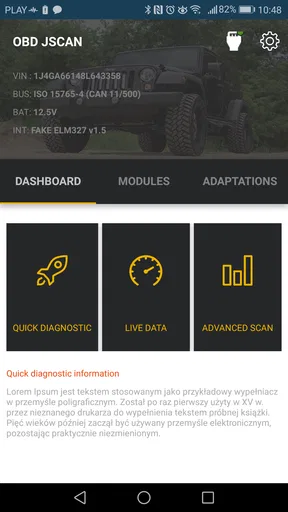
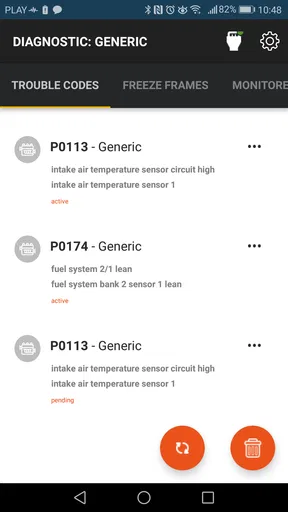
One of the first things you’ll notice is the app’s sleek and intuitive interface. It’s designed to be user-friendly, even for those who aren’t tech-savvy. The main dashboard gives you quick access to all the essential features, and the navigation is as smooth as your car should be after using this app!
Even with a straightforward layout, diagnostic terms can be unfamiliar. I would avoid clearing anything simply because a code looks alarming or because a warning light is annoying. First, record what the app reports and look up what it means for the specific vehicle. A code is a clue, not a complete diagnosis; the same symptom can have several possible causes, and the app cannot inspect a loose connection, worn part or other physical problem for you.
Features That Stand Out
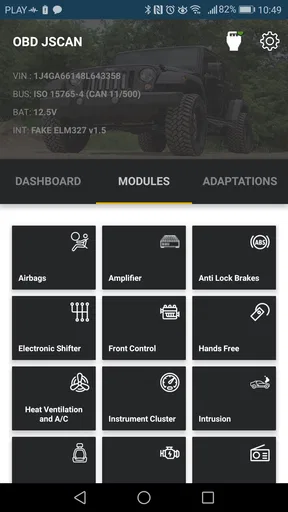
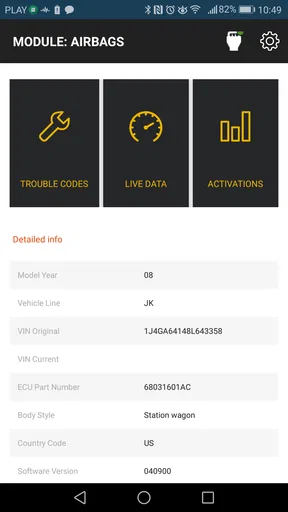
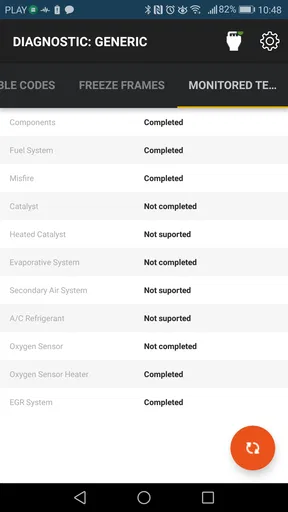
The real magic of OBD JScan lies in its features. From reading and clearing trouble codes to monitoring real-time vehicle data, this app does it all. You can keep an eye on everything from engine performance to fuel efficiency. Plus, it supports a variety of vehicle brands, making it versatile for different users.
Worth Reading Before You Choose

Flipboard Shows What News Apps Must Do Beyond the Feed

Switching to Android Auto Means Rethinking Your Driving Routine

Google Calendar Makes a Crowded Week Easier to Manage

Ludo King Makes the Most of the Minutes Between Plans

Baby Panda World Brings Quick Play to Modern Phones, but Its Game Library Feels Busy

ESPN’s Live Game View Makes Following Close Games Easier
For me, the most useful workflow is to read first, investigate second and clear only when there is a good reason. If a warning appears before a planned trip, I can use the reported code to have a more informed conversation with a mechanic instead of arriving with only “the light came on.” I’d keep a simple note of the code and the conditions around it—such as whether the engine was cold or the warning appeared during a particular drive—because that context can help a technician reproduce the issue.
There is an important trade-off in the ability to clear codes: it can tidy up the display, but it can also remove a useful indication before the underlying issue is fixed. If I clear a code and it returns, that is a reason to investigate rather than repeat the same action. Clearing a warning is not the same as repairing what caused it, and I would not use the app to justify driving when the vehicle feels unsafe or behaves unusually.
One feature I particularly love is the ability to customize vehicle settings. Want to tweak your car’s lighting or adjust the seatbelt alert? OBD JScan has got you covered. It’s like giving your car a mini upgrade without breaking the bank.
That flexibility is also where I would slow down. A setting that sounds cosmetic can affect how the vehicle behaves or what other drivers expect, so I would change one option at a time and keep track of the original value. Before changing anything, I’d check that the option applies to my exact vehicle and understand how to restore it. If I am unsure what a setting does, leaving it alone is the smarter choice than experimenting just because it is available.
Real-Time Monitoring
If you’re a data nerd like me, you’ll appreciate the real-time monitoring feature. It provides live data on everything from engine RPM to coolant temperature. This data can help you make informed decisions about maintenance and even improve your driving habits. Imagine having a constant stream of valuable insights right at your fingertips!
The practical value is less about staring at readings and more about using them to answer a specific question. For instance, if I am trying to understand a temperature concern, I can observe the coolant reading while safely parked and compare it with what the vehicle is doing, rather than guessing from a single glance at the dashboard. I would not handle a phone while driving; a passenger can observe it, or I can check readings before setting off and after parking.
Live figures can also be misleading without context. A reading that changes during warm-up is not automatically a fault, and one moment of data does not establish a trend. I would look for a repeatable pattern and connect it to symptoms. If the value seems implausible or the app loses connection, I would verify the adapter and seek a proper inspection rather than treating the display as definitive.
A useful handoff to a mechanic
For an owner who does not plan to repair the vehicle personally, the app can still help at the handoff. I would arrive with the warning or symptom described clearly, the code recorded, and any relevant live reading or setting change noted. That gives the mechanic a starting point without pretending I have already identified the failed part. It can also help me ask a more focused question about what needs testing and why.
There is a limit to that benefit: an app cannot replace inspection, specialised test equipment or a technician’s judgment. I would not use a code as grounds to challenge a diagnosis on its own, and I would not delay professional help for a serious warning, a loss of power, unusual noise or a safety-related problem. The best outcome is often a better-informed repair conversation, not a repair done entirely through a phone.
Cost-Effective Car Maintenance
Let’s talk dollars and cents. Frequent trips to the mechanic can add up, but with OBD JScan, many issues can be diagnosed at home. You’ll have the power to address minor problems before they become costly repairs. It’s like having a diagnostic tool that pays for itself.
The app itself is free to install, though in-app purchases range from $0.99 to $169.99 per item. I would check what is included for the vehicle and functions I actually need before spending anything, and I would not assume every capability is available at no cost. The free download is a low-friction way to examine the app, but the adapter and any relevant purchase are part of the full setup decision.
Compared with a basic code reader, a phone-based app can offer a more flexible way to view vehicle information and, for a compatible Jeep, Chrysler or Dodge, work with settings as well as diagnostics. A basic reader may be a better choice if all I want is a quick check-engine-code lookup, especially if I already own one. A garage remains the better alternative when I need a confirmed diagnosis, a physical repair or a safety assessment. OBD JScan makes most sense when I want to investigate and understand, not when I expect a phone to do the mechanic’s job.
Who will get the most from it
I’d recommend it most to owners of the supported marques who are comfortable learning what diagnostic information means, want to check a warning before arranging service, or enjoy monitoring vehicle data. It can also be handy for someone who maintains a vehicle over time and wants to make informed observations rather than relying on memory. The key is being willing to use the readings carefully and accept when a problem is beyond a home check.
I’d skip it if I only need a one-time, simple code read and do not want to buy or configure an adapter, or if I expect every warning to come with a certain fix. It is also not the right tool for someone who would be tempted to change unfamiliar settings or clear codes without understanding the consequences. In those cases, a basic reader or a direct visit to a qualified mechanic is a more sensible route.
Community and Support
Another great aspect of this app is its community. The developers are active in forums and provide fantastic support. If you ever run into a snag, the community is there to help. It’s comforting to know you’re not alone in your car diagnostic journey.
When asking for help, I’d include the vehicle details, the exact code or reading, what the car was doing, and what I had already tried. That is more useful than posting only that a warning appeared. I would still distinguish community suggestions from a confirmed diagnosis, especially before changing settings or buying parts. Advice can point me toward a useful check, but the condition of the vehicle should determine what happens next.
Availability and version
OBD JScan is a free Auto & Vehicles app, rated for Everyone, and it has an average rating of 4.8 from around 2.9K ratings, with 582 written reviews and over 100K installs. It was released on May 24, 2018, and the current version is v24.02.2026.22:45; it requires Android 5.0 or later. Those figures suggest a well-used app, but they do not guarantee that a particular adapter, vehicle or feature will suit my needs, so I would check compatibility before building a repair plan around it.
Final Thoughts
In a nutshell, OBD JScan is a stellar app for anyone who wants to keep their car running smoothly. It combines ease of use with powerful features, making it a top pick for both beginners and seasoned pros. So, if you’re looking to save some bucks and stay ahead of car troubles, give OBD JScan a spin. Your car—and your wallet—will thank you.
My recommendation comes with one qualification: treat it as a useful diagnostic companion, not a substitute for a mechanic or a guarantee of cheap repairs. For the right Jeep, Chrysler or Dodge owner, it can turn a confusing warning into a more productive next step, whether that means checking a reading, reviewing a setting carefully or explaining the issue at a repair shop. Used with that restraint, it is a practical tool; used as a reason to ignore symptoms or make blind changes, it is not.
Pros
- User-friendly interface for beginners.
- Comprehensive diagnostic capabilities.
- Compatible with a wide range of vehicles.
- Regular updates with new features.
- Affordable compared to professional tools.
Cons
- Limited to vehicles with OBD-II ports.
- Advanced features require in-app purchases.
- Some features need an internet connection.
- Occasional connectivity issues reported.
- User support can be slow to respond.
FAQs for OBD JScan
What is OBD JScan and how does it work?
OBD JScan is a diagnostic application designed for vehicles, allowing users to read and clear trouble codes, view live data, and perform various diagnostic functions. It connects to the vehicle's OBD-II port using a compatible Bluetooth or Wi-Fi adapter, providing access to detailed information about the car's performance and potential issues.
Which vehicles are compatible with OBD JScan?
OBD JScan is compatible with a wide range of vehicles that support the OBD-II protocol, which includes most cars and light trucks manufactured after 1996 in the United States. However, compatibility can vary based on the make and model, so it's recommended to check the app's compatibility list or contact support for specific vehicle information.
What features does OBD JScan offer?
OBD JScan offers a variety of features, including reading and clearing diagnostic trouble codes, viewing real-time sensor data, performing system tests, and configuring certain vehicle settings. It also provides the ability to monitor vehicle performance and diagnose issues, making it a versatile tool for both casual and professional users.
Are there any subscription or in-app purchase costs for OBD JScan?
OBD JScan may require a one-time purchase or subscription for full access to its features, depending on the platform and region. Some functionalities might be available for free, but others, like advanced diagnostics or specific vehicle configurations, could involve additional costs. It's advisable to review the pricing details in the app store before downloading.
Is OBD JScan easy to use for beginners?
OBD JScan is designed with user-friendliness in mind, featuring an intuitive interface that guides users through various diagnostic procedures. Whether you are a car enthusiast or a professional mechanic, the app provides clear instructions and detailed information, making it accessible even for those new to vehicle diagnostics.


